

How to use the Realtor Smart Bio Funnel Template
Published March 20, 2026
This template turns a realtor bio link into a guided lead funnel instead of a static list of links.
Instead of sending Instagram, Facebook, email, and QR-code traffic to a generic homepage, you send visitors into a focused path based on what they actually want to do next: browse homes, request a valuation, book a showing, or contact your team.
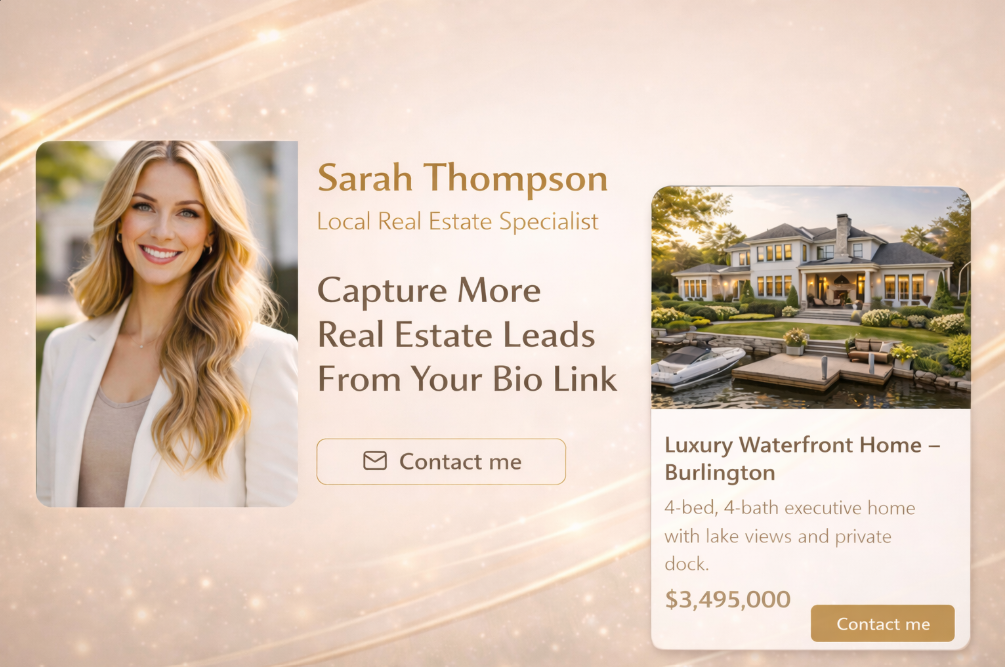
Use this template when you want one mobile-first destination for buyer leads, seller leads, featured listings, and direct inquiries.
What this template does
The Realtor Smart Bio Funnel combines three jobs into one experience:
- a polished link-in-bio page
- short buyer and seller qualification flows
- lead capture points tied to intent
That means a visitor does not need to figure out where to go next. The funnel helps them self-select, and you collect context before the conversation starts.
Why this works better than a static bio page
A normal link page gives every visitor the same flat list of options.
This template creates guided paths instead:
- Buyers can start a home search flow and share budget, location, and timing.
- Sellers can request a valuation and signal whether they are just exploring or ready to list.
- Hot leads can book a showing or contact you directly.
- Lower-intent visitors can subscribe to listing alerts and stay in your pipeline.
For agents, the benefit is not just more leads. It is better lead quality, cleaner segmentation, and faster follow-up.
Funnel structure
1. Smart bio page
The entry page replaces a generic Linktree-style layout with a clearer real estate action menu.
Common buttons include:
- Find homes
- Get a home valuation
- View featured listings
- Book a showing
- Contact us
- Subscribe to listing alerts
Each button can route visitors into a different quiz step, funnel path, or external destination.
2. Buyer and seller qualification flows
Instead of dropping visitors into a generic form, the template uses short guided flows to collect real buying or selling intent.
For buyer flows, capture signals like:
- preferred property type
- target area or neighborhood
- price range
- move timeline
For seller flows, capture signals like:
- property type
- city or neighborhood
- estimated selling timeline
- valuation interest
This gives you more context than a simple name-and-email form and makes your outreach easier to personalize.
3. Featured listings section
The template can surface featured property cards directly on the bio page so visitors can engage immediately.
This is useful when you want to:
- showcase active listings
- keep traffic inside the funnel
- create interest before asking for contact details
4. Multi-point lead capture
Lead capture does not need to happen in only one place.
This template can collect leads after:
- a home search flow
- a valuation request
- a listing alerts opt-in
- a direct contact inquiry
Because the funnel captures context first, each lead can be tagged based on what the visitor actually wants.
Recommended lead tags
Use response tags to mark the signals that matter most for follow-up.
Examples:
lead_type_buyerlead_type_sellerbudget_highlocation_oakvilletimeline_hotvaluation_requestlisting_alerts
These tags make it easier to prioritize hot leads, segment automations, and send more relevant listings or outreach.
Real-world example
Imagine a buyer clicks your Instagram bio link after seeing a new listing reel.
Instead of landing on a generic homepage, they:
- tap
Find homes - answer a few short questions
- enter their email to receive curated matches
Now you have more than a raw lead. You know what they are looking for, where they want to buy, and how soon they may move.
The same structure works for sellers. A homeowner can tap Get a home valuation, answer a short set of questions, and submit their details with clear selling intent attached.
Where to use this template
This template works especially well for:
- Instagram bio links
- Facebook and Instagram ads
- QR codes on signage, postcards, and open-house materials
- email signatures
- text message follow-ups
Any channel that sends top-of-funnel traffic can benefit from a destination that routes by intent instead of dumping visitors onto a broad website.
Best fit
This template is a strong fit for:
- solo realtors
- real estate teams
- new agents building a pipeline
- listing-focused agents
- social-first real estate brands
Implementation checklist
Before publishing, make sure you:
- rewrite button copy to match your market and brand
- update featured listings or featured offers
- set up buyer and seller question paths
- place lead capture before high-value results or requests
- add response tags for budget, location, and timeline
- test every CTA on mobile
Result
The end result is not just a prettier bio page.
It is a conversion-focused real estate funnel that helps visitors choose the right path, captures meaningful lead data, and gives you a smarter pipeline for follow-up.
Next steps
Preview the template and use it as the starting point for your own real estate funnel.
See the feature overview for mobile-first bio funnel routing and CTA structure.
Read the broader funnel playbook for social traffic and CTA design.
Browse more practical build guides and template walkthroughs.